
Jeep Wrangler: Head Restraints / Front Head Restraints
To raise the head restraint, pull upward on the head restraint. To lower the head restraint, push the adjustment button located on the base of the head restraint, and push downward on the head restraint. The release button does not need to be pushed to adjust the head restraint.
To remove the head restraint, raise it as far as it can go then push the adjustment button and the release button at the base of each post while pulling the head restraint up. To reinstall the head restraint, put the head restraint posts into the holes and push downward. Then adjust it to the appropriate height.
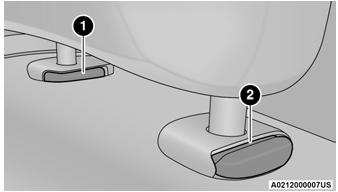
Front Head Restraint
- Release Button
- Adjustment Button
WARNING!
- A loose head restraint thrown forward in a collision or hard stop could cause serious injury or death to occupants of the vehicle. Always securely stow removed head restraints in a location outside the occupant compartment.
- ALL the head restraints MUST be reinstalled in the vehicle to properly protect the occupants. Follow the re-installation instructions above prior to operating the vehicle or occupying a seat.
NOTE:
Do not reposition the head restraint 180 degrees to the incorrect position in an attempt to gain additional clearance to the back of the head.
 Head Restraints
Head restraints are designed to reduce the risk
of injury by restricting head movement in the
event of a rear impact. Head restraints should
be adjusted so that the top of the head restraint
is located above the top of your ear...
 Rear Head Restraints — Two Door Models
The rear seat is equipped with non-adjustable,
but foldable head restraints.
To fold the outboard head restraint, pull on the
release strap located on the upper outboard
side of each rear seat...
Other information:
Jeep Wrangler 2018-2026 Owners Manual: When To Use 4WD Low Range
When off-road driving, shift into 4WD Low for additional traction and control on slippery or difficult terrain, ascending or descending steep hills, and to increase low speed pulling power. This range should be limited to extreme situations such as deep snow, mud, steep inclines, or sand where additional low speed pulling power is needed...
Jeep Wrangler 2018-2026 Owners Manual: Trac-Lok Rear Axle — If Equipped
The Trac-Lok rear axle provides a constant driving force to both rear wheels and reduces wheel spin caused by the loss of traction at one driving wheel. If traction differs between the two rear wheels, the differential automatically proportions the usable torque by providing more torque to the wheel that has traction...
Categories
- Manuals Home
- Jeep Wrangler Owners Manual
- Jeep Wrangler Service Manual
- Engine Coolant Level — 2.0L
- Jack Location
- Draining Fuel/Water Separator Filter — Diesel Engine
- New on site
- Most important about car
Manual Seat Height Adjustment
The driver's seat height can be raised or lowered by using the ratcheting handle, located on the outboard side of the seat. Pull upward on the handle to raise the seat, push downward on the handle to lower the seat. Several strokes may be necessary to achieve the desired position.

Seat Height Adjustment
