
Jeep Wrangler: OFF-ROAD PAGES — IF EQUIPPED / Pitch & Roll
The Pitch & Roll page displays the vehicle’s current pitch (angle up and down) and roll (angle side to side) in degrees. The pitch and roll gauges provide a visualization of the current vehicle angle.
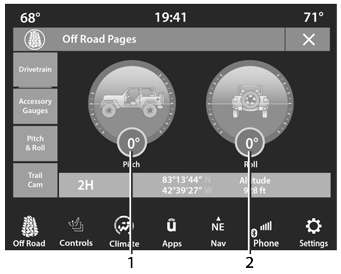
Pitch & Roll Menu 2WD/4WD
- Current Pitch
- Current Roll
 Accessory Gauge
The Accessory Gauge page displays the current
status of the vehicle’s Coolant Temperature, Oil Temperature, Oil Pressure (Gas
Vehicles Only),
Transmission Temperature, and Battery
Voltage...
 TrailCam — If Equipped
Your vehicle may be equipped with a TrailCam
that allows you to see an on-screen image of the
front view of your vehicle. The image will be
displayed on the touchscreen along with a
caution note “Check Entire Surroundings”
across the top of the screen...
Other information:
Jeep Wrangler 2018-2026 Owners Manual: Occupant Classification System (OCS) — Front Passenger Seat
The Occupant Classification System (OCS) is part of a Federally regulated safety system for this vehicle. It is designed to activate or deactivate the Passenger Advanced Front Air Bag depending on the occupant’s seated weight. It is designed to deactivate the Passenger Advanced Front Air Bag for an unoccupied seat and for occupants whose seated weight classifies them in a category other than a properly seated adult...
Jeep Wrangler 2018-2026 Owners Manual: Cruise Control — If Equipped
When engaged, the Cruise Control takes over accelerator operations at speeds greater than 20 mph (32 km/h). The Cruise Control buttons are located on the right side of the steering wheel. Cruise Control Buttons SET (+)/Accel CANC/Cancel SET (-)/Decel On/Off RES/Resume NOTE: In order to ensure proper operation, the Cruise Control system has been designed to shut down if multiple Cruise Control functions are operated at the same time...
Categories
- Manuals Home
- Jeep Wrangler Owners Manual
- Jeep Wrangler Service Manual
- Auxiliary Switches — If Equipped
- Display Warnings And Maintenance
- 2.0L Engine and 3.6L Engine
- New on site
- Most important about car
Erasing All The HomeLink® Channels
To erase the channels, follow this procedure:
Place the ignition switch into the ON/RUN position. Push and hold the two outside HomeLink® buttons (I and III) for up to 20 seconds, or until the HomeLink® indicator light flashes.NOTE:
Erasing all channels should only be performed when programming HomeLink® for the first time. Do not erase channels when programming additional buttons.

Copyright © 2026 www.jewrangler.com